
Figure 1 — Availability Machines dashboard
*** ## What does the Availability Machine home page show? Clicking a service name on the dashboard opens its AM home page. The source DB status is shown next to the service name. ### Top-right buttons | Button | Action | | --------------------- | --------------------------------------------------------------------------------------------------------------------------------------------------------------------------- | | **DB Service** | Opens the My Services home page for this database service. See [MySQL My Services](/tessell/database-engines/tessell-for-mysql/db-services/readme-mysql/homepage-mysql.md). | | **Dataflix** | Opens the Dataflix home page for this database service. See [Dataflix](/tessell/database-engines/tessell-for-mysql/db-services/dataflix-mysql.md). | | **Update RPO Policy** | Opens the RPO policy wizard to configure snapshot schedules and binary log archival. | ### Summary panel Expand the top bar to view a summary of the AM, grouped into three sections: **RPO Policy and DB details** | Field | Description | | -------------------- | --------------------------------------------- | | **RPO Policy** | Retention days and backup type as configured | | **Transaction Logs** | Whether binary log archiving is enabled | | **Source DB Status** | Current status of the source database service | **Cloud details** | Field | Description | | ---------- | ------------------------------------------- | | **Cloud** | Cloud provider hosting the database service | | **Region** | Cloud region of the database service | **User details** | Field | Description | | ----------- | ---------------------------------------------------------------------------- | | **Owner** | Tessell account username of the AM owner | | **My role** | Your role: Owner, Co-owner, or Read-only | | **TRN** | Tessell Resource Name — globally unique identifier for use with Tessell APIs | The AM home page has the following tabs: **Data Flow**, **Snapshots**, **Sanitization**, **Native Backups**, **Access Policies**, **Clones**, and **Sharing**.
Figure 2 — Availability Machine home page
*** ## How do I update the RPO Policy? Click **Update RPO Policy** on the AM home page. The **Update RPO Policy and Schedule** window opens with two configurable sections: ### Include Transactional Logs Select the **Include Transactional Logs** checkbox to enable Tessell to archive binary log (binlog) segments every 5 minutes. Logs are stored in Amazon S3 (AWS) or Azure Blob Storage (Azure). ### Schedule Snapshots Toggle **Schedule Snapshots** to enable automated snapshot capture. Tessell uses cloud-native snapshots as the default backup mechanism. Snapshots are application-consistent, always incremental, and faster to restore than traditional backups. 1. Select a configuration type: **Standard** or **Custom**. 2. For **Standard**: * Specify snapshot retention (1–35 days). * Pick the daily time for snapshots. 3. For **Custom**: * Choose an RPO policy from the dropdown (create policies in [DB Governance](/tessell/app-families/governance/db-governance.md) under Governance). * Pick the daily time for snapshots. * Review the **RPO Policy Details** panel (policy description, type, and whether PITR is enabled). 4. Under **Snapshot frequency**, configure: | Field | Description | | -------------- | ---------------------------------------------------------------------------------------------------- | | **RPO Policy** | Selected policy options: Continuous Recovery (PITR), Daily, Weekly, Monthly, and/or Yearly Snapshots | | **Every** | Frequency for weekly/monthly/yearly schedules. Daily shows the scheduled time. Disabled for PITR. | | **Keep for** | Retention period (days) per the selected RPO policy | 5. Click **Update** to apply all changes. > **Note:** Automated RPO scheduling is not supported for MySQL native backups — native backups are always created manually. See [Native Backups](#native-backups). *** ## What does the Data Flow tab show? The Data Flow tab is a visual representation of how data moves through the AM. * The **source DB box** represents your primary database service. * The **AM box** (center) is the data management layer receiving continuous data from the source. * The **RPO policy box** (handshake icon) shows the configured backup schedule. * **Region boxes** show where snapshots and binary logs are replicated to, as configured by DAPs. A continuous stream flows from the source DB to the AM, representing ongoing snapshot and binary log capture. For multi-AZ (HA) services, snapshots and binary log backups are taken from the primary node and replicated to the replica region boxes. Regions with manual snapshots only do not show a continuous data stream, since manual snapshots are retained only until you delete them. Use the **+** / **−** icons (bottom left) to zoom in or out, or the expand icon to view in full screen. *** ## Snapshots Tessell automatically captures snapshots on the schedule defined by your RPO policy. You can also take manual ad-hoc snapshots at any time. The Snapshots tab shows all snapshots for the service. ### Snapshot status reference | Status | Description | | ------------- | ------------------------------------------------------------ | | **Available** | Snapshot is complete and ready to use | | **Queued** | Snapshot is scheduled and waiting for a prior task to finish | | **Creating** | Snapshot capture is in progress | | **Failed** | Snapshot did not complete successfully | ### Snapshot table columns | Column | Description | | ----------------- | --------------------------------------------------------------------------------------------------------------------- | | **Snapshot Name** | Name of the snapshot | | **Availability** | Number of regions where the snapshot is available. Click to see region name, status, access policy, and shared users. | | **Status** | Current snapshot status (see above) | | **Size (GiB)** | Snapshot size in GiB | | **Snapshot Time** | Exact date and time the snapshot was captured | The **Manual Snapshots** view (the default) lists all manually triggered snapshots. The **Automatic Snapshots** view lists snapshots taken per the RPO policy. Use the **Search** bar to find a snapshot by name; use the **Status** filter to narrow by state. > **Note:** Tessell does not automatically delete manual snapshots. You must delete them manually from this tab. Automatic snapshots are deleted per the RPO policy — update the retention period and time using **Update RPO Policy**. ### How do I take a manual snapshot? 1. Click **+ Take Snapshot** (top right of the Snapshots tab). 2. Enter a **Snapshot Name**. 3. Click **Submit**. As an alternative, use the **Code** button (bottom-left of the dialog) to generate API calls in Shell, Python, Go, Java, JavaScript, or PowerShell. ### How do I star or unstar a snapshot? Automatic snapshots, automatic sanitized snapshots, and automatic native backups are deleted after their retention period. **Starring** an automatic entry prevents automatic deletion indefinitely. > **Note:** Manual snapshots, manual sanitized snapshots, and manual native backups are never automatically deleted — they do not need to be starred. **To star:** 1. In the **Automatic Snapshots** view of the Snapshots, Sanitization, or Native Backups tab, click the ellipsis icon on the entry → **Star**. 2. Review the notice (additional storage costs may apply) → click **Star** to confirm. A star icon appears next to the entry. The entry is retained until you unstar it. **To unstar:** 1. Click the ellipsis icon on the starred entry → **Unstar**. 2. Review the notice (the entry resumes its original retention schedule) → click **Unstar** to confirm. > **Note:** If the original retention period has already elapsed, the entry is queued for deletion immediately after unstarring. Starred snapshots and backups can be independently retained during service deletion. See [Delete the service](/tessell/database-engines/tessell-for-mysql/db-services/readme-mysql/managing-services-mysql.md#how-do-i-delete-a-database-service).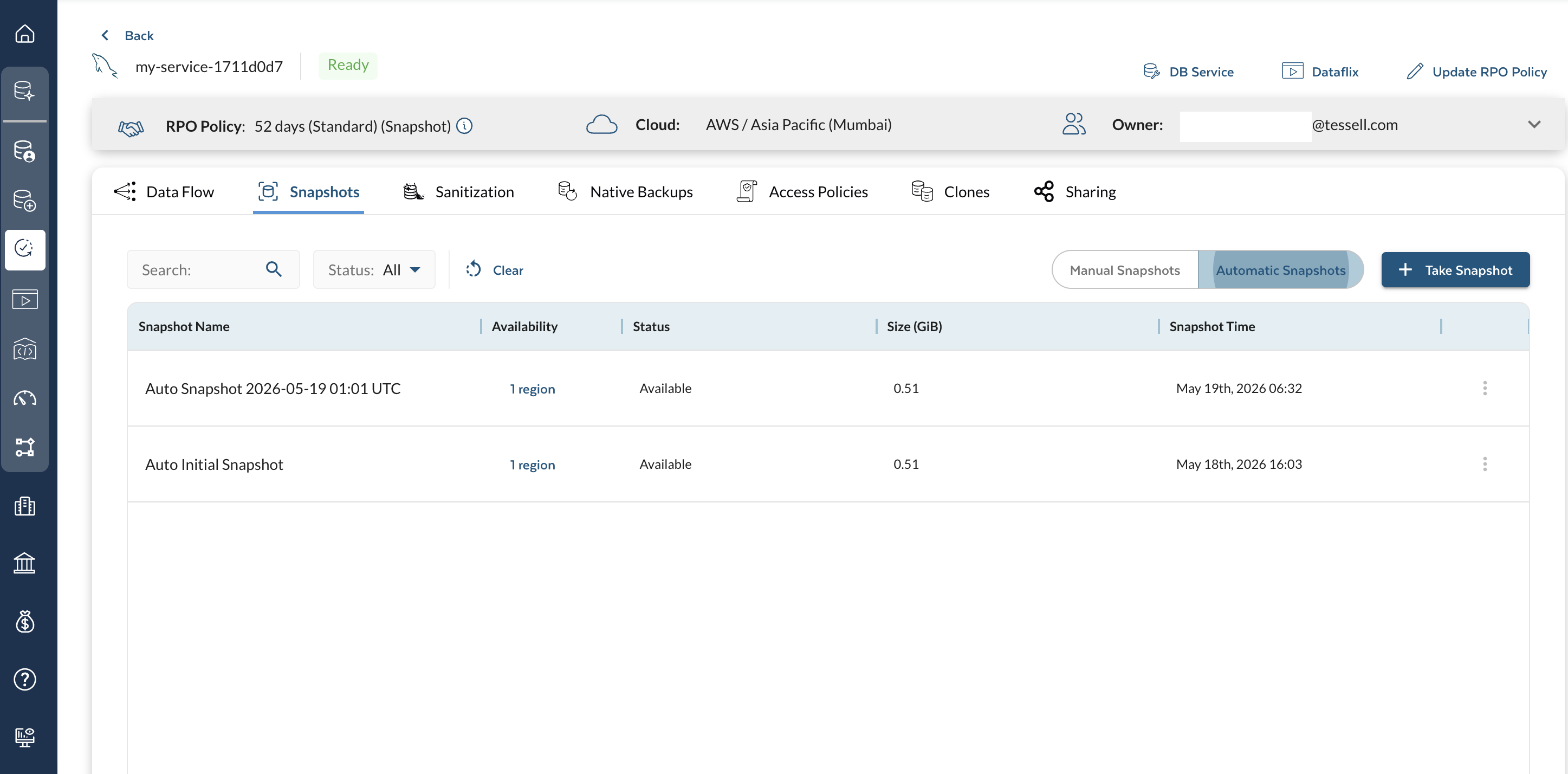
Figure 3 — Snapshots tab
*** ## Sanitization Tessell sanitization creates a masked copy of production data before it is used in lower environments (testing, development, training). You provide a SQL masking script; Tessell applies it by: 1. Creating a temporary clone VM from the source snapshot. 2. Running the masking SQL script against the MySQL databases on the clone VM. 3. Capturing a new snapshot from the masked clone — this is the sanitized snapshot. Sanitized snapshots can be shared or used for cloning, just like regular snapshots. Sanitization is available both on-demand and as an automated schedule. > **Prerequisite:** Upload your SQL masking script to the [Script Library](/tessell/database-engines/tessell-for-mysql/db-services/script-library-mysql.md) under **DB Services** before sanitizing. ### Sanitized snapshot table columns | Column | Description | | ----------------------- | ------------------------------------------------------------------------------------------------------------ | | **Snapshot Name** | Name of the sanitized snapshot | | **Status** | Available, Queued, Creating, or Failed | | **Schedule Name** | Name of the automated sanitization schedule that created this snapshot (empty for manual) | | **Size (GiB)** | Size of the sanitized snapshot in GiB | | **Script Name/Version** | Name and version of the SQL masking script applied | | **Availability** | Regions where the sanitized snapshot is available; click for region, status, access policy, and shared users | | **Snapshot Time** | Exact date and time the sanitized snapshot was captured | Filter sanitized snapshots using the **Status** filter or the **Script** filter. Use the **Search** bar to find by name. > **Note:** Sanitized snapshots can be starred to prevent automatic deletion. See [How do I star or unstar a snapshot?](#how-do-i-star-or-unstar-a-snapshot) ### How do I create a sanitized snapshot? 1. Click **+ Sanitize Snapshot**. 2. Enter a **Sanitized snapshot name**. 3. Choose a **Source snapshot** (manual or automatic) from the dropdown. 4. Choose a **Data masking script** from the dropdown. 5. Choose the **Script version**. 6. Click **Submit**. Use the **Code** button (bottom left of the dialog) to generate API calls in Shell, Python, Go, Java, JavaScript, or PowerShell. ### How do I create a sanitization schedule? Automated schedules sanitize snapshots at a configured frequency without manual intervention. 1. Click **+ Create Schedule**. 2. Fill in the schedule details: | Field | Description | | -------------------------- | ---------------------------------------------------------- | | **Schedule Name** | Name for this sanitization schedule | | **Description** | Optional description | | **Frequency** | Daily (every day) or Weekly (select specific days) | | **Keep each snapshot for** | Retention period for sanitized snapshots (days or weeks) | | **Snapshot name prefix** | Prefix for sanitized snapshot names (default: "Sanitized") | | **Script** | SQL masking script to apply | | **Script version** | Version of the selected script | 3. Click **Save**. Click **Show Schedules** to list all existing sanitization schedules. Each schedule entry shows: **Schedule Name**, **Script info** (name and version), **Retention**, **Snapshot Name Prefix**, and **Create on** (timestamp).
Figure 4 — Sanitization tab
*** ## Native Backups Native backups for MySQL use **Percona XtraBackup**, a MySQL-compatible physical backup utility. Percona XtraBackup supports non-blocking hot backups for InnoDB databases, built-in compression, and direct streaming to cloud object storage. Native backups are always triggered manually from a selected snapshot: a temporary clone VM is created from the snapshot, and Percona XtraBackup runs on the clone VM, avoiding any load on the source database. > **Note:** Automated RPO scheduling is not supported for MySQL native backups. ### Native backup table columns | Column | Description | | ---------------- | ----------------------------------------------------------------------------------------------------- | | **Backup Name** | Name assigned at creation | | **Status** | Available, Queued, Creating, or Failed | | **Size** | Backup size in GiB | | **Type** | Full or Incremental | | **Availability** | Regions where the backup is available; click for region name, status, access policy, and shared users | | **Created on** | Date and time the backup was taken | | **Shared With** | Users with access to this backup | Use the **Search** bar to find a backup by name. Use the ellipsis icon on a row to **Delete** a backup. > **Note:** Native backups can be starred to prevent automatic deletion. See [How do I star or unstar a snapshot?](#how-do-i-star-or-unstar-a-snapshot) ### How do I create a manual native backup? 1. Click **+ Create Backup**. The **Create Manual Backup** window opens. 2. Enter a **Backup Name**. 3. Choose the **Source snapshot** (manual or automatic) from the dropdown. 4. Click **Create**. A workflow runs at the backend and captures the backup for your database service using Percona XtraBackup. > **Note:** Manual native backups can be downloaded and deleted from the UI. Use the **Code** button (bottom-left corner) to generate API calls in Shell, Python, Go, Java, JavaScript, or PowerShell. ### How do I download a native backup? For manually triggered native backups, use the **Download** button in the Dataflix tab to generate a pre-signed URL for downloading the backup files from S3 or Blob Storage. This lets you restore the database outside of Tessell — on-premises, on another cloud VM, or in a different environment.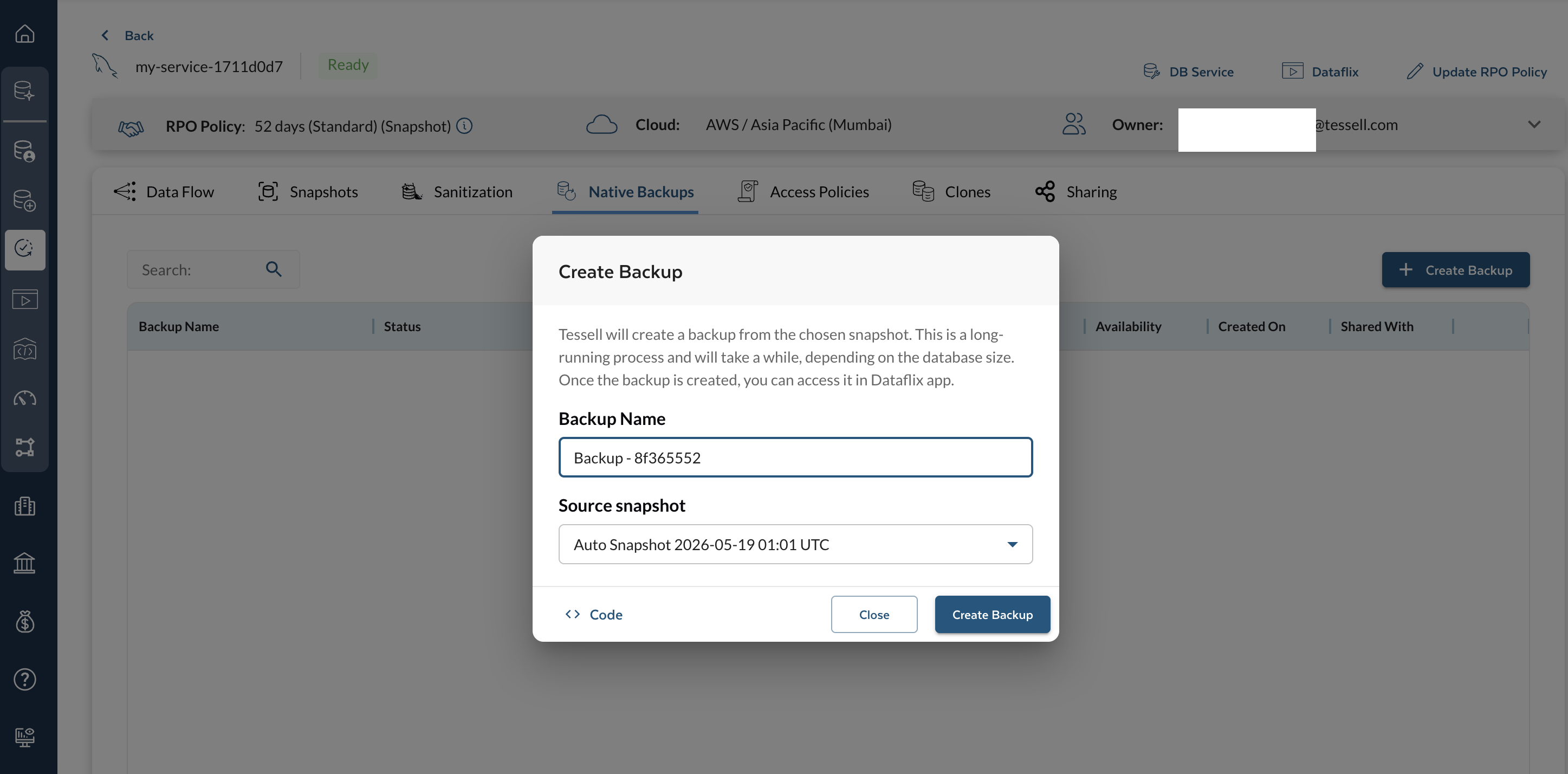
Figure 5 — Native Backups tab
*** ## Access Policies (DAP) A Data Access Policy (DAP) defines **what** data is shared, **with whom**, **where** (same or cross-region, same or cross-subscription), and **how** (as-is, sanitized, or native backup). DAPs enable data owners to make snapshots or binary logs available for secondary use cases — DR, testing, staging, archiving, migration — without copying data manually. If the DAP has continuous recovery (PITR) enabled, you can also create a point-in-time database copy, and use the DAP to refresh lower environments on a regular cadence. ### DAP cross-region and cross-subscription support | DAP type | Same subscription, any region | Cross-subscription, same region | Cross-subscription, cross-region | | ------------------ | ----------------------------- | ------------------------------- | -------------------------------- | | **Snapshot-only** | Supported | Supported | Supported | | **PITR** | Supported | Not supported | Not supported | | **Native Backups** | Supported | Supported | Supported | ### DAP table columns | Column | Description | | --------------------- | -------------------------------------------------------------- | | **Policy Name** | Name of the access policy | | **Status** | Active or Inactive | | **Shared Across** | Number of subscriptions the data is shared to | | **Content Type** | As-is, sanitized, or backups — and whether automated or manual | | **Available Content** | Frequency and retention period for the shared content | Use the **Search** bar to find a policy by name. Use the ellipsis icon on a policy row for **Manage Access**, **Update**, or **Delete Policy**. ### How do I create a Data Access Policy? 1. Click **+ Create Policy**. 2. In **Policy Name**, enter a name for the policy. 3. In **Target subscription**, configure the destination: * Choose a **subscription** from the dropdown. * Choose a **target region** for replication. * Choose an **encryption key**. * Add more regions if needed. * In **Add users to grant access**, select the users who can access the replicated data. 4. Select the **data access mode**: **As-Is Data** — share source snapshots and/or PITR logs without processing. * Choose **Automated** or **Manual** snapshots. * For automated: set frequency and retention period. * Toggle the switch to change retention days for PITR and daily frequency. * For manual: select from the available manual snapshot list. **Sanitized Data** — share post-processed (masked) snapshots. * Choose **Automated** or **Manual** sanitized snapshots. * For automated: choose a sanitization schedule from the dropdown, and set frequency and retention period. * For manual: select from the available manual sanitized snapshot list. * **Note:** PITR is only available in As-Is mode. **Backups** — share native backup access for complete recovery. * Choose **Automated** or **Manual** backups. * For automated: set frequency and retention period. * For manual: select from the available manual backups list. 5. Click **Submit**. Use the **Code** button (top right of the window) to generate API calls in Shell, Python, Go, Java, JavaScript, or PowerShell. ### How do I manage an existing access policy? Click the ellipsis icon on a policy row: **Manage Access** — add or remove users from an existing policy. 1. Select **Manage Access**. 2. Add or remove usernames. 3. Click **Update Access**. **Update** — modify the policy name, target subscription, or content settings. **Delete Policy** — permanently remove the policy. 1. Select **Delete Policy**. 2. Check the **Remove the access policy** confirmation checkbox. 3. Click **Remove**. > Deleting a policy revokes all user access granted through it and removes replicated cloud snapshots from the target regions.
Figure 6 — Access Policies tab
*** ## Clones The Clones tab lists all database clones created from this AM using the Availability Machine and Dataflix applications. ### Clones table columns | Column | Description | | ------------------ | --------------------------------------------------------------- | | **Name** | Cloned service name | | **Status** | Creating, Ready, Stopped, or Deleted | | **Cloud/Region** | Cloud provider and region of the cloned service | | **Source** | Source snapshot name, timestamp, and content type (e.g., as-is) | | **Infrastructure** | Compute shape of the cloned service | | **Created** | Date and time the clone was requested | Filter by owner using the **Owner** field next to the search bar. ### How do I create a clone? 1. Click **+ Create Clone**. This opens the Dataflix application with a list of available snapshots (timestamp, size, and regions). 2. Select a snapshot to review details (creation timestamp, size, number of databases, cloud details). 3. Click **Clone** (bottom right). 4. Configure the clone: | Setting | Notes | | ----------------------------------- | ---------------------------------------------------------------------------------------------- | | **Service name, description, tags** | Identify the clone | | **Cloud provider settings** | Region, VPC/VNet, subnet | | **Compute shape** | Parent database server configuration is shown; storage cannot be changed for a clone | | **Database instance** | Master credentials and connection settings | | **Additional settings** | Maintenance window, Performance Insights, and Availability Machine configuration for the clone | 5. Click **+ Clone Service** to submit. Tessell automatically: 1. Submits the clone request. 2. Creates the compute instance(s). 3. Configures the database. 4. Sets up the Availability Machine. 5. Triggers the first snapshot.
Figure 7 — Clones tab
*** ## Sharing The Sharing tab allows you to share the Availability Machine with other Tessell users, granting them access to AM data (snapshots, backups, policies, and clones). ### How do I share the Availability Machine? 1. Click **Share** (top right of the Sharing tab). 2. Choose a **Role**: Co-owner or Read-only. 3. Search for users using the **Search** bar. 4. Move users from the **Choices** column to the **Chosen** column to grant access. > Only users with **Data Owner** roles appear in the Choices column. Manage users and roles in the [IAM application](/tessell/app-families/governance/iam.md) under Governance. 5. Click **Save**. ### How do I change a user's role or remove their access? The Sharing tab lists all users the AM is shared with and their roles. Click the ellipsis icon on a user row: **Change Role** 1. Select **Change Role**. 2. Choose **Co-owner** or **Read-only** from the dropdown. 3. Click **Update**. **Remove User** 1. Select **Remove User**. 2. Confirm the removal → click **Remove**.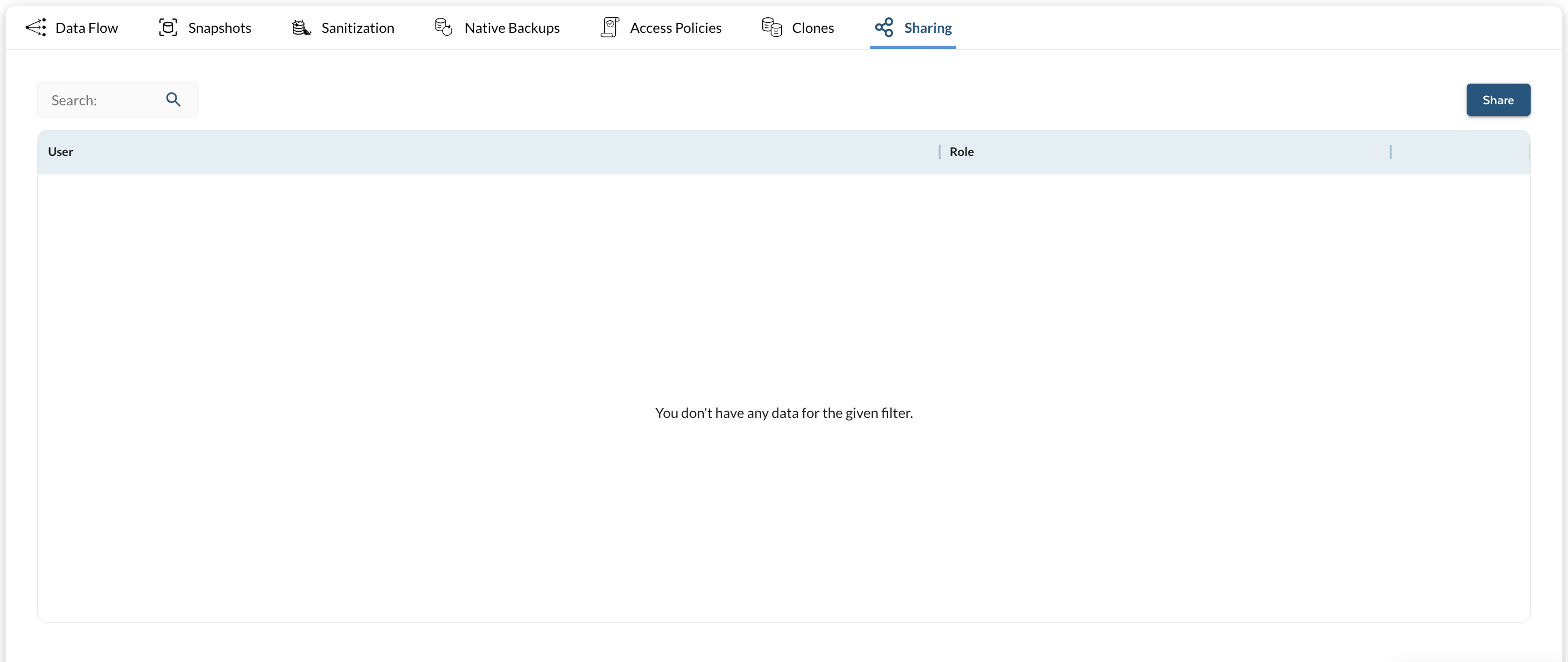
Figure 8 — Sharing tab
*** ## Glossary | Term | Definition | | ----------------------------------------- | ---------------------------------------------------------------------------------------------------------------------------------------------------------------------------------------------------------------------------------------------------------------------------------------------------------------------- | | **Binary Log (Binlog)** | Sequential records of all changes made to a MySQL database. Binary log segments are archived every 5 minutes and stored in S3 (AWS) or Blob Storage (Azure). Used for point-in-time recovery, replication, and continuous data protection. Binary logging must be enabled for HA, DR, and Read Replica configurations. | | **Clone** | A duplicate of an existing database created from a snapshot, native backup, or PITR recovery point. Used for testing, development, or troubleshooting without affecting the production database. | | **Data Access Policy (DAP)** | Defines rules for sharing AM data — who can access it, what they can access, in which region, and under what schedule. | | **Native Backup** | A backup created using Percona XtraBackup, a MySQL-compatible physical backup utility. Supports full and incremental backup types. | | **Percona XtraBackup** | An open-source, enterprise-grade MySQL backup utility. Provides non-blocking physical backups of InnoDB tables, incremental backup support, built-in compression, and native S3/Azure Blob Storage support. Tessell uses Percona XtraBackup as the underlying engine for MySQL native backups. | | **Recovery Point Objective (RPO) Policy** | Specifies the maximum acceptable data loss, measured in time. Defines how frequently snapshots and binary log captures occur. | | **Sanitization** | The process of creating a secure version of production data by applying data-masking SQL scripts to the snapshots. Ensures that snapshots can be safely used for development, testing, or analytics without exposing confidential information. | | **Snapshot** | A point-in-time copy of a database service's storage volumes. For MySQL, Tessell uses cloud-native incremental snapshots that are application-consistent. | --- # Agent Instructions This documentation is published with GitBook. GitBook is the documentation platform designed so that both humans and AI agents can read, navigate, and reason over technical content effectively. Learn more at gitbook.com. ## Querying This Documentation If you need additional information that is not directly available in this page, you can query the documentation by asking a question. Perform an HTTP GET request on the following URL with the `ask` and `goal` query parameters: ``` GET https://docs.tessell.com/tessell/database-engines/tessell-for-mysql/db-services/am-mysql.md?ask=