> For the complete documentation index, see [llms.txt](https://docs.tessell.com/tessell/llms.txt). Markdown versions of documentation pages are available by appending `.md` to page URLs; this page is available as [Markdown](https://docs.tessell.com/tessell/database-engines/tessell-for-mysql/db-services/readme-mysql/homepage-mysql.md).
# Database Service home page
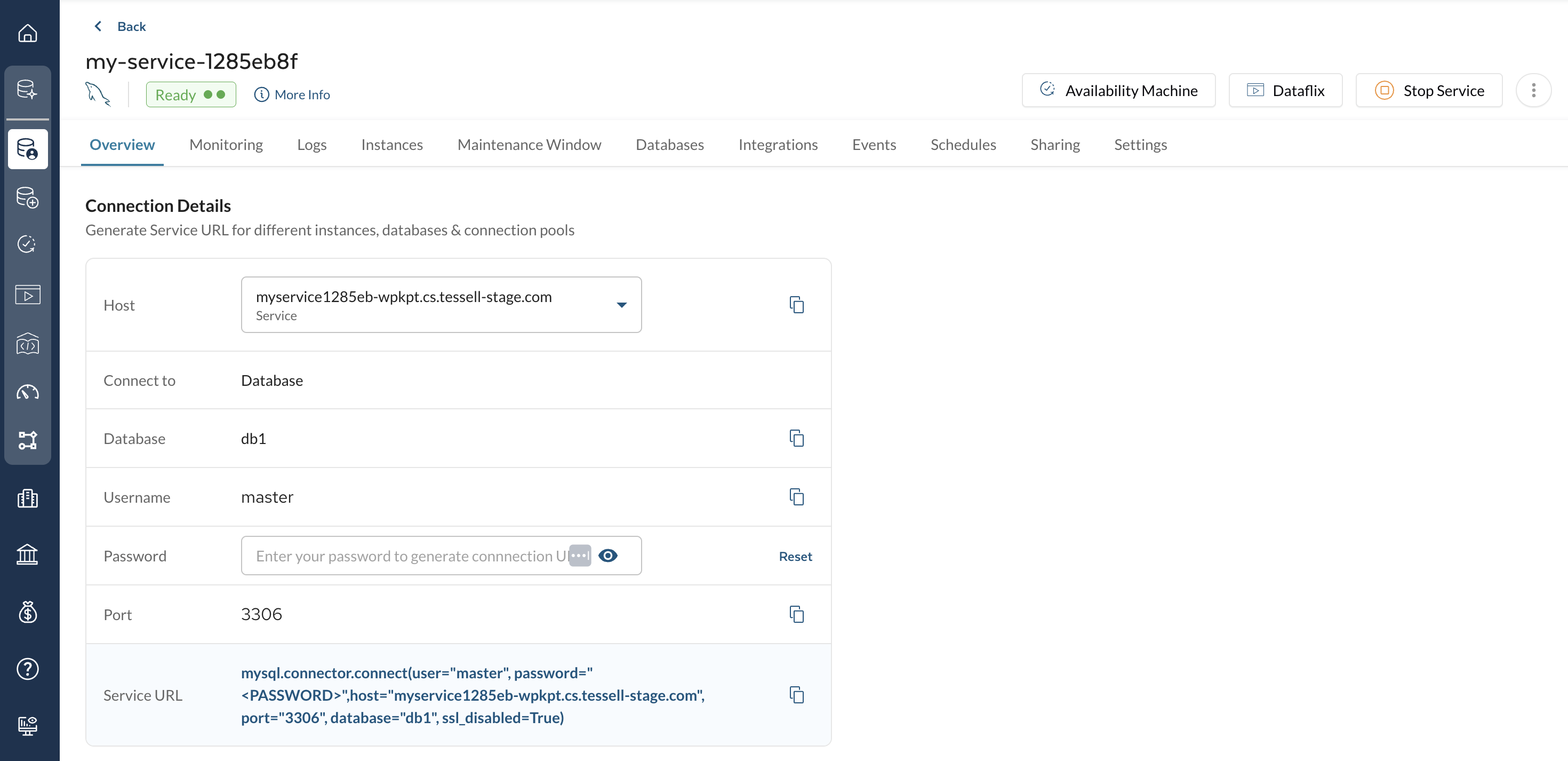
The database service home page is the central control plane for a single MySQL database service. It displays the service status, provides quick-access action buttons, and organizes management capabilities across tabs: Overview, Monitoring, Logs, Instances, Maintenance Window, Databases, Integrations, Events, Schedules, Sharing, and Settings.
***
## What status indicators appear next to the service name?
| Indicator | When it appears | What to do |
| ------------------------------ | --------------------------------------------------- | --------------------------------------------------------------------------------------------------------------------------------------- |
| **Snapshot icon** | A manual or automatic snapshot is in progress | Click the icon to see the details of the ongoing snapshot |
| **Patch Available** | A higher patch version is available from Tessell | Click to start patching — see [MySQL Engine Upgrades](/tessell/database-engines/tessell-for-mysql/db-services/mysql-engine-upgrades.md) |
| **Parameter Update available** | A new version of the parameter profile is available | Hover to see which profiles are available; use [Change Parameter Profile](#how-do-i-change-the-parameter-profile) to apply |
| **Upcoming schedules** | A start, stop, or delete schedule is approaching | Hover to view the scheduled action and timing |
***
## What details does the More Info panel show?
Click the **More Info** icon (ⓘ) to see a full summary of the service, grouped into categories:
**Cloud details**
| Field | Description |
| -------------------- | ---------------------------------------------------- |
| Cloud | Cloud provider |
| Region | Cloud region |
| Availability Zone(s) | AZ(s) used |
| Subscription | The Tessell subscription associated with the service |
| VPC or VNet | Virtual network the service is attached to |
| Private subnet | Private subnet the service is attached to |
**Storage details**
| Field | Description |
| ---------------- | ------------------------------------ |
| Storage Provider | Storage type for your cloud provider |
| Volume Size | Storage size in GiB |
| Max throughput | Maximum throughput in MiB/s |
| IOPS | Provisioned IOPS value |
**Primary Server and Compute**
| Field | Description |
| ------------- | ---------------------------------------------------------- |
| Server name | Server where your database is deployed |
| Compute shape | Selected compute shape (click the tooltip for shape specs) |
| vCPUs | Number of vCPUs allocated |
| Memory | Amount of memory allocated |
**Software details**
| Field | Description |
| ----------------- | --------------------------------------------------------------- |
| Software version | Database engine version |
| Parameter Profile | Parameter profile name (click tooltip for all parameter values) |
| Option Profile | Option profile name (click tooltip for all option values) |
| Edition | Database engine edition |
**Owner**
| Field | Description |
| ------------- | --------------------------------------------------------------------------- |
| Owner | Username of the service owner |
| My Role | Your role: Owner, Co-owner, or Read-only |
| Date created | Date and time the service was created |
| Running since | Date and time the database has been continuously running |
| TRN | Tessell Resource Name — a globally unique ID for use with Tessell REST APIs |
**Observability**
| Field | Description |
| ------------ | -------------------------------------------------- |
| Alert policy | The alert policy selected for the database service |
***
## What actions are available from the top-right buttons?
| Button | Action |
| ------------------------ | ----------------------------------------------------------------------------------------------------------------------------------------------------------- |
| **Availability Machine** | Opens the Availability Machine home page for this service. See [Availability Machine](/tessell/database-engines/tessell-for-mysql/db-services/am-mysql.md). |
| **Dataflix** | Opens the Dataflix home page for this service. See [Dataflix](/tessell/database-engines/tessell-for-mysql/db-services/dataflix-mysql.md). |
| **Start Service** | Starts the service (visible only when the service is stopped). |
| **Stop Service** | Stops the service (visible only when the service is running). |
***
## How do I restore a database service?
Restore restores a copy of data from a chosen point in time into a new VM of the same shape as the source. Most configurations are kept unchanged in the restore operation. Tessell supports **out-of-place restore** only.
### Restore from a snapshot
1. Click the ellipsis icon (︙) → **Restore** → select **Snapshot** → **Next**. This opens the Dataflix application, where you can view available snapshots with their timestamps, storage sizes, and number of regions.
2. Select a snapshot and review its details.
3. Click **Select to Restore**.
4. Choose your database and compute shape for the new server.
5. Specify the master username and master password.
6. Click **Restore**. Tessell automatically:
* Submits the request to restore the database service up to the given snapshot time
* Creates compute instance(s)
* Configures the database
* Sets up the Availability Machine
* Triggers the first snapshot
### Restore using PITR
1. Click the ellipsis icon (︙) → **Restore** → select **PITR** → **Next**. This opens the Dataflix application.
2. Pick a time to restore your service on the Regions and Availability Zones view.
3. Click **Select to Restore**.
4. Specify the master username and master password.
5. Click **Restore**. The same automatic steps as snapshot restore are performed.
***
## How do I edit or delete the service from the home page?
Click the ellipsis icon (︙) for these additional actions:
| Action | Description |
| ---------------- | ------------------------------------------------------------------------------------------------------------------------------------------------------------------------------------------------------------------------------------------------------------------------- |
| **Edit Service** | Rename the service, update the description, enable delete/stop protection, or enable auto minor version update. See [Edit the service](/tessell/database-engines/tessell-for-mysql/db-services/readme-mysql/managing-services-mysql.md#how-do-i-edit-a-database-service). |
| **Delete** | Delete the service. See [Delete the service](/tessell/database-engines/tessell-for-mysql/db-services/readme-mysql/managing-services-mysql.md#how-do-i-delete-a-database-service). |
***
## How do I resize compute or storage?
| Resize type | Downtime impact | Notes |
| ------------------ | --------------------------------------------------------------------------- | --------------------------------------------------------------------------------------------- |
| **Compute resize** | Downtime required; HA services use a rollover approach to minimize downtime | Ensure the new compute shape is available in the target cloud region and zone before resizing |
| **Storage resize** | No downtime | Storage can only be increased; shrinking is not supported |
> **Note:** Tessell highly recommends taking a snapshot before resizing.
### Steps to resize compute
1. Click the ellipsis icon (︙) → **Resize** → **Resize compute** tab.
2. For multi-instance services, select which instances to modify under **MODIFY COMPUTE** (primary and HA are always modified together and cannot be deselected individually). By default, all instances are selected.
3. Choose the number of vCPUs from the **No. of vCPUs** dropdown — the **Select compute shape** dropdown updates to show shapes available for that vCPU count.
4. Choose a compute shape from the **Select compute shape** dropdown.
5. Optionally, choose a parameter profile from the dropdown.
6. Select the **I understand the consequences, resize the compute** checkbox and click **Save**.
7. Tessell automatically stops the database, applies the new settings, and starts it back up.
### Steps to resize storage
1. Click the ellipsis icon (︙) → **Resize** → **Resize storage** tab.
2. Specify the new total **Storage**, **IOPS**, and **Throughput** values under **MODIFY STORAGE**.
> The value you enter is the total storage you need (existing storage plus any additional amount), not just the additional amount.
3. For multi-instance services, specify IOPS and Throughput per instance (storage resize applies to all instances and cannot be modified per individual instance).
4. Select the **I understand the consequences, resize the storage** checkbox and click **Save**.
5. Tessell applies the new settings non-disruptively.
***
## How do I change the parameter profile?
You can apply a new parameter profile to the service, or apply pending changes from the existing profile.
> **Note:** Tessell highly recommends taking a snapshot before changing the parameter profile, to prevent data loss.
Use the timing option that matches your urgency:
| Timing option | Behavior |
| ------------------------------- | -------------------------------------------------------------------------------------------------------- |
| **Apply in maintenance window** | Changes are applied in the next scheduled maintenance window |
| **Apply later** | Creates a one-time custom maintenance window at your chosen time |
| **Apply immediately** | Applies all pending changes right now, regardless of the maintenance window. May cause service downtime. |
### Steps to change the parameter profile
1. Click the ellipsis icon (︙) → **Change Parameter Profile**.
2. Choose a new parameter profile from the dropdown.
3. Select a timing option.
4. Select the **I understand the consequences, apply changes immediately** checkbox.
5. Click **Apply**.
***
## How do I use the Code button for programmatic access?
The **Code** button is available for Restore, Resize, and Change Parameter Profile. It generates ready-to-run code in **Shell, Python, Go, Java, JavaScript,** and **PowerShell**.
1. Click **Code** in the wizard dialog.
2. On the left, view the API, its type, and the payload.
3. On the right, view the generated code and copy or download it using the buttons provided.
4. Click **Close** to return to the main window.
***
## What tabs are available on the database service home page?
The following tabs provide detailed management capabilities:
| Tab | Purpose |
| ------------------------------------------------------------------------------------------------------------------------------ | ----------------------------------------------------------------- |
| [Overview](/tessell/database-engines/tessell-for-mysql/db-services/readme-mysql/homepage-mysql/overview-mysql.md) | Connection details, private links, allowed IPs |
| [Monitoring](/tessell/database-engines/tessell-for-mysql/db-services/readme-mysql/homepage-mysql/mysql-monitoring-metrics.md) | OS metrics, DB metrics, Performance Insights |
| [Logs](/tessell/database-engines/tessell-for-mysql/db-services/readme-mysql/homepage-mysql/logs-mysql.md) | MySQL DB logs |
| [Instances](/tessell/database-engines/tessell-for-mysql/db-services/readme-mysql/homepage-mysql/instances-mysql.md) | Instance topology, switchover, add replica |
| [Maintenance Window](/tessell/database-engines/tessell-for-mysql/db-services/readme-mysql/homepage-mysql/maintenance-mysql.md) | Schedule and view maintenance activities |
| [Databases](/tessell/database-engines/tessell-for-mysql/db-services/readme-mysql/homepage-mysql/databases-mysql.md) | Create and delete databases within the service |
| [Integrations](/tessell/database-engines/tessell-for-mysql/db-services/readme-mysql/homepage-mysql/integrations-mysql.md) | Datadog, Sumo Logic integrations |
| [Events](/tessell/database-engines/tessell-for-mysql/db-services/readme-mysql/homepage-mysql/events-mysql.md) | Full audit log of service actions |
| [Schedules](/tessell/database-engines/tessell-for-mysql/db-services/readme-mysql/homepage-mysql/schedules-mysql.md) | Start/stop/delete schedules |
| [Sharing](/tessell/database-engines/tessell-for-mysql/db-services/readme-mysql/homepage-mysql/sharing-mysql.md) | Share the service with other users |
| [Settings](/tessell/database-engines/tessell-for-mysql/db-services/readme-mysql/homepage-mysql/settings-mysql.md) | Timezone, maintenance window, performance insights, observability |
Figure 1 — Database Service home page
---
# Agent Instructions
This documentation is published with GitBook. GitBook is the documentation platform designed so that both humans and AI agents can read, navigate, and reason over technical content effectively. Learn more at gitbook.com.
## Querying This Documentation
If you need additional information that is not directly available in this page, you can query the documentation by asking a question.
Perform an HTTP GET request on the following URL with the `ask` and `goal` query parameters:
```
GET https://docs.tessell.com/tessell/database-engines/tessell-for-mysql/db-services/readme-mysql/homepage-mysql.md?ask=&goal=
```
`ask` is the immediate question: it should be specific, self-contained, and written in natural language.
`goal` is what the user is ultimately trying to achieve, the reason they need the answer. Sharing it helps GitBook give you a better, more relevant answer. A goal is most helpful when it describes the outcome the user wants rather than restating the question. For example, with `ask=how do I create an API token`, a goal like `automate deployments from our CI pipeline` lets GitBook tailor the answer to that use case.
The response will contain a direct answer to the question and relevant excerpts and sources from the documentation.
Use this mechanism when the answer is not explicitly present in the current page, you need clarification or additional context, or you want to retrieve related documentation sections.