
> For the complete documentation index, see [llms.txt](https://docs.tessell.com/tessell/llms.txt). Markdown versions of documentation pages are available by appending `.md` to page URLs; this page is available as [Markdown](https://docs.tessell.com/tessell/database-engines/tessell-for-oracle/db-services/my-services/my-services-dashboard.md).

# My Services dashboard

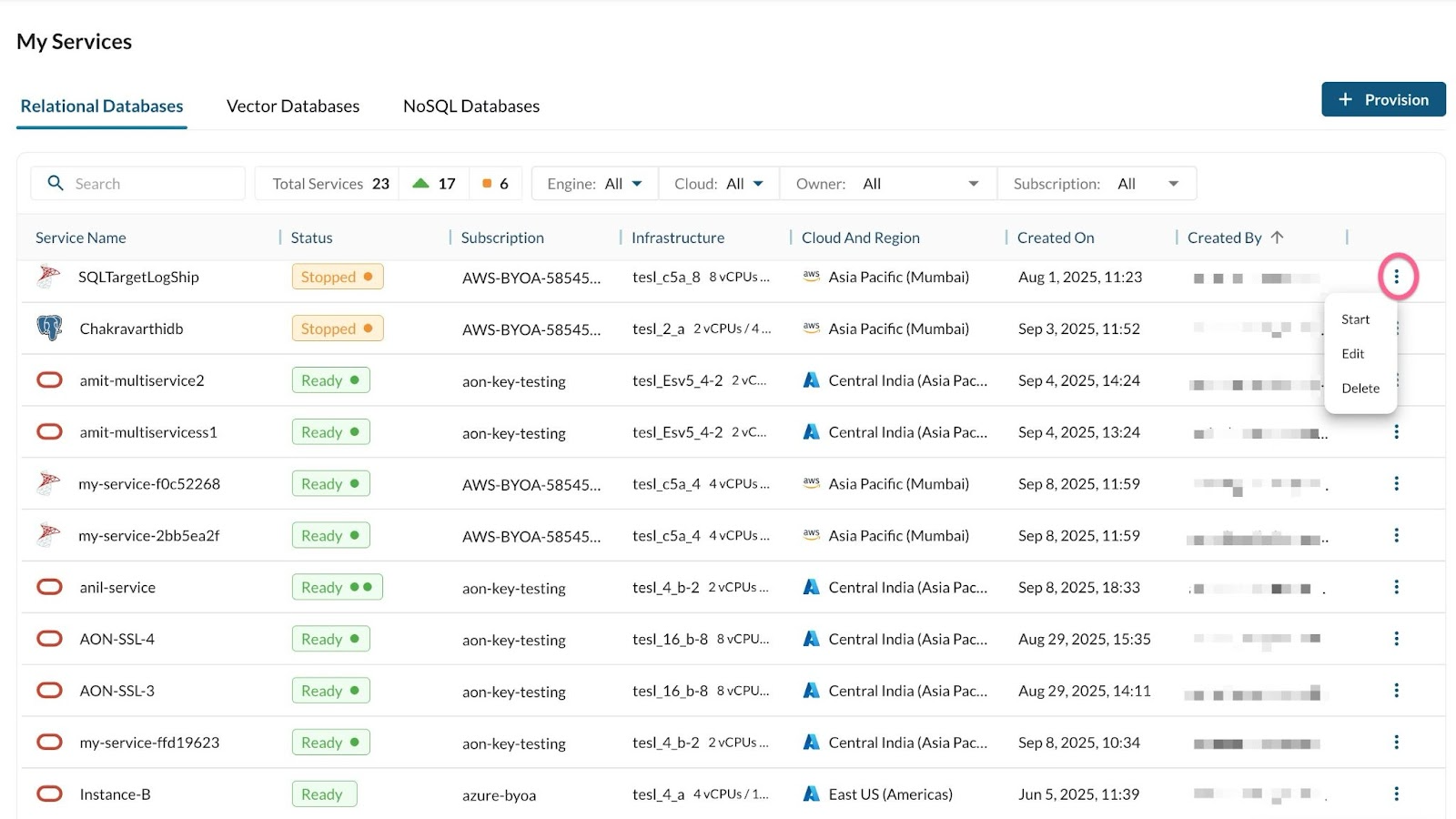
The My Services dashboard is the primary landing page for all your database services. It organises services into tabs by category — **Relational**, **NoSQL**, and **Vector** — so you can quickly locate any service regardless of engine. Only services where you hold an Owner, Co-owner, or Read-only role are displayed.

***

## How do I filter and search for database services?

The dashboard toolbar provides the following filters:

| Filter           | Behaviour                                                                     |
| ---------------- | ----------------------------------------------------------------------------- |
| **Search**       | Type a service name to narrow the list instantly                              |
| **Engine**       | Filter by All, MySQL, Oracle, PostgreSQL, or SQL Server                       |
| **Cloud**        | Filter by All, AWS, Azure, or GCP                                             |
| **Owner**        | Filter by a specific user; defaults to all services shared with you           |
| **Subscription** | Filter by subscription; defaults to all subscriptions accessible to your role |

The **Total Services** counter shows real-time counts by state:

| Symbol                        | Meaning                             |
| ----------------------------- | ----------------------------------- |
| Green triangle                | Running services                    |
| Orange square                 | Stopped services                    |
| Grey play button              | Starting / creating services        |
| Red cylinder with exclamation | Failed services / failed operations |

<div align="center"><img src="https://3421475909-files.gitbook.io/~/files/v0/b/gitbook-x-prod.appspot.com/o/spaces%2FXNKiIctERJykfezXfUU2%2Fuploads%2Fgit-blob-ac56182518a48e77397d70dc488edd2d81cea23b%2Funknown.png?alt=media" alt="" width="374"></div>

***

## What information does each row in the dashboard show?

| Column               | Description                                                                                                                                              |
| -------------------- | -------------------------------------------------------------------------------------------------------------------------------------------------------- |
| **Service Name**     | Name assigned at provisioning, with the engine icon. Click to open the service home page.                                                                |
| **Status**           | Current state with instance-count dots (see below). May show patch icons if updates are available.                                                       |
| **Subscription**     | The cloud subscription hosting the service. Manage subscriptions in [Subscriptions](/tessell/app-families/governance/subscriptions.md) under Governance. |
| **Infrastructure**   | Compute shape selected at provisioning.                                                                                                                  |
| **Cloud and Region** | Cloud provider and region where the service is hosted.                                                                                                   |
| **Created On**       | Date and time the service was created.                                                                                                                   |
| **Created By**       | Username that provisioned the service.                                                                                                                   |

<div align="center"><img src="https://3421475909-files.gitbook.io/~/files/v0/b/gitbook-x-prod.appspot.com/o/spaces%2FXNKiIctERJykfezXfUU2%2Fuploads%2Fgit-blob-7be7e986a7f19c110b0be2f3068d02bccd7abf80%2Funknown.png?alt=media" alt="" width="900"></div>

<p align="center"><em>Figure 1 — My Services dashboard</em></p>

***

## What do the instance dots next to a service status mean?

The number of dots next to the status icon indicates how many instances make up the service:

* **One dot** — single-node service
* **Two dots** — two-node service (primary + one replica, HA/DR/RR)
* **Three or more dots** — three or more nodes

***

## What do the patch icons next to a service status mean?

| Icon                 | Meaning                                                                                                                                                                                                                                                 |
| -------------------- | ------------------------------------------------------------------------------------------------------------------------------------------------------------------------------------------------------------------------------------------------------- |
| **Update available** | An OS patch or DB patch is ready to apply. Click to go to the service home page to see the type of update: DB updates are applied from the service home page; OS updates link to the [Maintenance Center](/tessell/app-families/maintenance-center.md). |
| **Update scheduled** | A patch is already scheduled for this service. Click to view scheduling details on the service home page.                                                                                                                                               |

> **Note:** Patch icon visibility depends on server type and role:
>
> * **Dedicated server** — both OS and DB patch icons are visible to all roles.
> * **Shared server** — only the DB patch icon appears in My Services. The OS patch icon is shown in the Servers app and the Maintenance Center.
> * **HA services** — only the DB patch icon is shown; OS patching is not applicable.

***

## What does each service status mean and what actions are available?

| Status                                 | Description                                                           | Actions allowed                                                                                                                                                                                             |
| -------------------------------------- | --------------------------------------------------------------------- | ----------------------------------------------------------------------------------------------------------------------------------------------------------------------------------------------------------- |
| **Ready**                              | Service is up and running; connections are accepted.                  | All actions: stop, edit, restore, resize compute/storage, update parameter profile, reset password, modify connectivity, switchover, add/delete databases, enable integrations, configure schedules, share. |
| **Starting**                           | Service is starting up; connections not yet accepted.                 | Edit the service                                                                                                                                                                                            |
| **Stopping**                           | Stop has been triggered; connections are being closed.                | Edit the service                                                                                                                                                                                            |
| **Stopped**                            | Service is not running.                                               | Start the service                                                                                                                                                                                           |
| **Down**                               | Primary instance (HA or single) is down — unplanned downtime.         | Start the instance                                                                                                                                                                                          |
| **Deleting**                           | Delete has been triggered; deletion is in progress.                   | No actions allowed                                                                                                                                                                                          |
| **Creating**                           | Provisioning is in progress.                                          | No actions allowed                                                                                                                                                                                          |
| **Failed**                             | Provisioning or restore failed.                                       | Remove the entry manually, or wait — failed entries are auto-cleaned after 60 minutes.                                                                                                                      |
| **Rebuilding**                         | Compute or storage resize is in progress.                             | No actions allowed                                                                                                                                                                                          |
| **Under\_maintenance**                 | Maintenance activity is running per the scheduled maintenance window. | Delete, restore, resize compute/storage, update parameter profile, reset password, modify connectivity, switchover, add/delete databases, configure schedules, share.                                       |
| **Switchover**                         | HA replica is being promoted to primary.                              | No actions allowed                                                                                                                                                                                          |
| **Degraded**                           | One replica in an HA service is down.                                 | All actions except stop.                                                                                                                                                                                    |
| **Healing**                            | Tessell detected unplanned downtime and is auto-healing.              | No actions allowed                                                                                                                                                                                          |
| **Patching**                           | Oracle patch is being applied.                                        | No actions allowed                                                                                                                                                                                          |
| **Updating**                           | Parameter profile update is in progress.                              | No actions allowed                                                                                                                                                                                          |
| **Parameter\_profile\_update\_failed** | Parameter profile update failed; service is still Ready.              | All actions allowed                                                                                                                                                                                         |
| **Rebuild\_failed**                    | Compute/storage resize did not complete; service is still Ready.      | All actions allowed                                                                                                                                                                                         |
| **Backing\_up**                        | A snapshot is running.                                                | Edit the service                                                                                                                                                                                            |
| **Start\_failed**                      | Service restart failed.                                               | Start the service                                                                                                                                                                                           |
| **Stop\_failed**                       | Service stop failed.                                                  | All actions allowed                                                                                                                                                                                         |
| **Switch\_over\_failed**               | HA switchover failed.                                                 | All actions allowed                                                                                                                                                                                         |

> **Note:** For all failed-operation statuses, raise a support ticket via the **Report a problem** option.


---

# Agent Instructions
This documentation is published with GitBook. GitBook is the documentation platform designed so that both humans and AI agents can read, navigate, and reason over technical content effectively. Learn more at gitbook.com.

## Querying This Documentation
If you need additional information that is not directly available in this page, you can query the documentation dynamically by asking a question.

Perform an HTTP GET request on the current page URL with the `ask` query parameter, and the optional `goal` query parameter:

```
GET https://docs.tessell.com/tessell/database-engines/tessell-for-oracle/db-services/my-services/my-services-dashboard.md?ask=<question>&goal=<endgoal>
```

`ask` is the immediate question: it should be specific, self-contained, and written in natural language.
`goal` is optional and describes the broader end goal you are ultimately trying to accomplish on behalf of the user. GitBook uses it to tailor the answer towards what is most useful for that goal.

The response will contain a direct answer to the question and relevant excerpts and sources from the documentation.

Use this mechanism when the answer is not explicitly present in the current page, you need clarification or additional context, or you want to retrieve related documentation sections.
