> For the complete documentation index, see [llms.txt](https://docs.tessell.com/tessell/llms.txt). Markdown versions of documentation pages are available by appending `.md` to page URLs; this page is available as [Markdown](https://docs.tessell.com/tessell/database-engines/tessell-for-postgresql/db-services/dataflix-postgresql-doc.md).
# Dataflix
The Dataflix application is a specialized data management app that lets you browse snapshots, backups, and point-in-time recovery (PITR) regions for available services, as well as deleted services with retained snapshots. You can restore databases for disaster recovery or create clones for non-production use. You can also download database backups.
While the Availability Machine focuses on producing data backup components — snapshots, native backups, sanitized snapshots, and PITR (WAL) logs — Dataflix focuses on consuming those components, whether for recovering from disasters, restoring production databases, or creating development and test environments. You do this by cloning that data into new database services, or downloading backups for use outside Tessell.
***
## Prerequisites
* Ensure that you have created your PostgreSQL database service. See [Provisioning a PostgreSQL DB service](/tessell/database-engines/tessell-for-postgresql/db-services/provisioning-postgresql.md).
* Ensure that you have scheduled snapshots or backups in the Availability Machine application. See [Availability Machine](/tessell/database-engines/tessell-for-postgresql/db-services/am-postgresql-doc.md).
***
## What can I do in Dataflix?
| Capability | Description |
| --------------------------------- | ----------------------------------------------------------------------------- |
| **Clone from PITR** | Create a database clone at any point in time within the available PITR window |
| **Clone from snapshot** | Create a database clone from a specific manual or automatic snapshot |
| **Clone from sanitized snapshot** | Create a clone from a masked snapshot for dev/test environments |
| **Download a backup** | Download a native backup for use outside Tessell |
**Access scope:** If you own the database service, the full data catalog is available. If the service is shared with you, you can only access data points within the regions the owner has configured in the Data Access Policy.
***
## What does the Dataflix dashboard show?
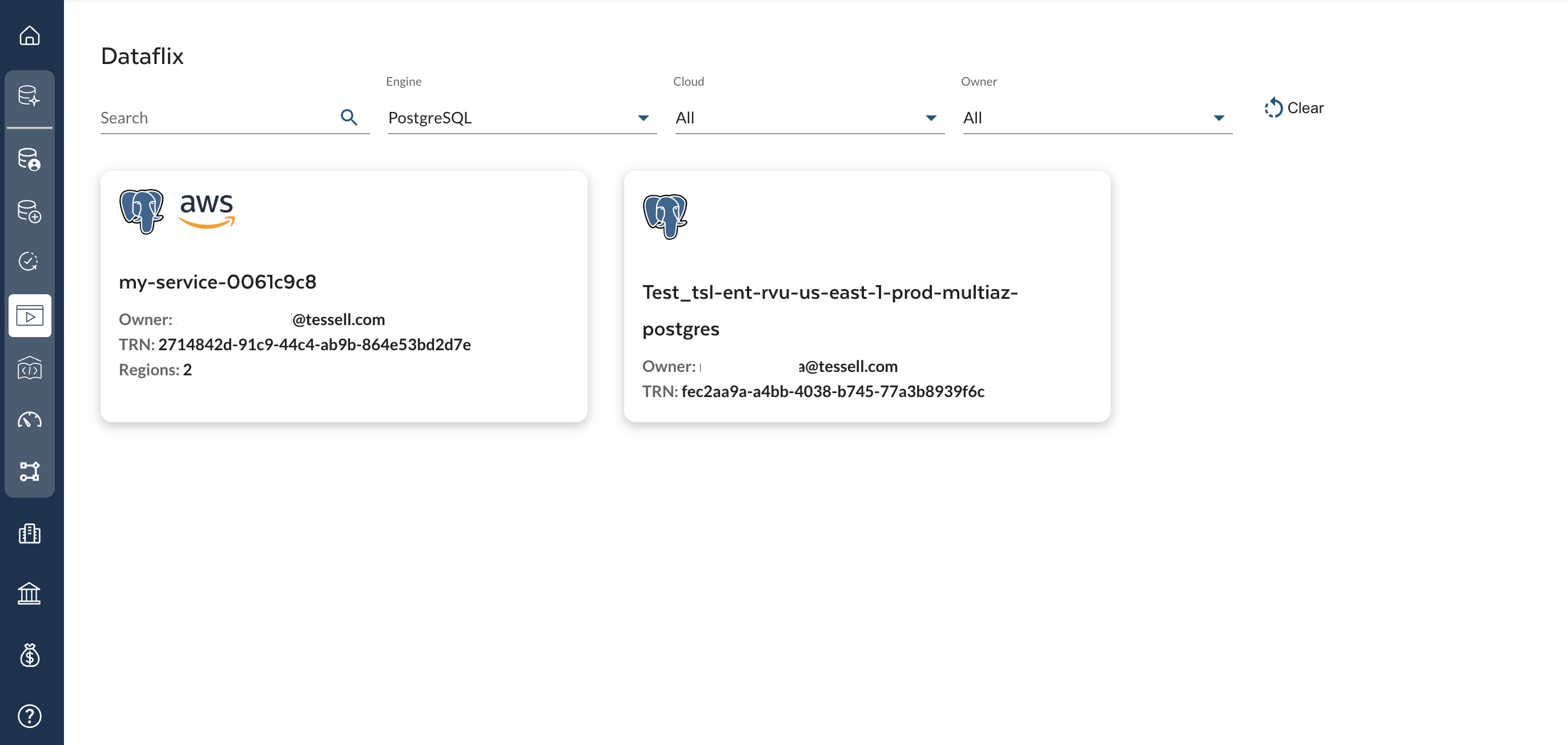
The Dataflix dashboard lists all database services available to you, across all engines and clouds. Click any service name to open its Dataflix home page.
### Dashboard filters
| Filter | Behaviour |
| ---------- | --------------------------------------------- |
| **Search** | Filter by database service name |
| **Engine** | All, Oracle, MySQL, PostgreSQL, or SQL Server |
| **Cloud** | All, AWS, Azure, or GCP |
| **Owner** | Filter by username or All |
| **Clear** | Reset all filters to defaults |
Figure 1 — Dataflix dashboard
***
## What does the Dataflix home page show?
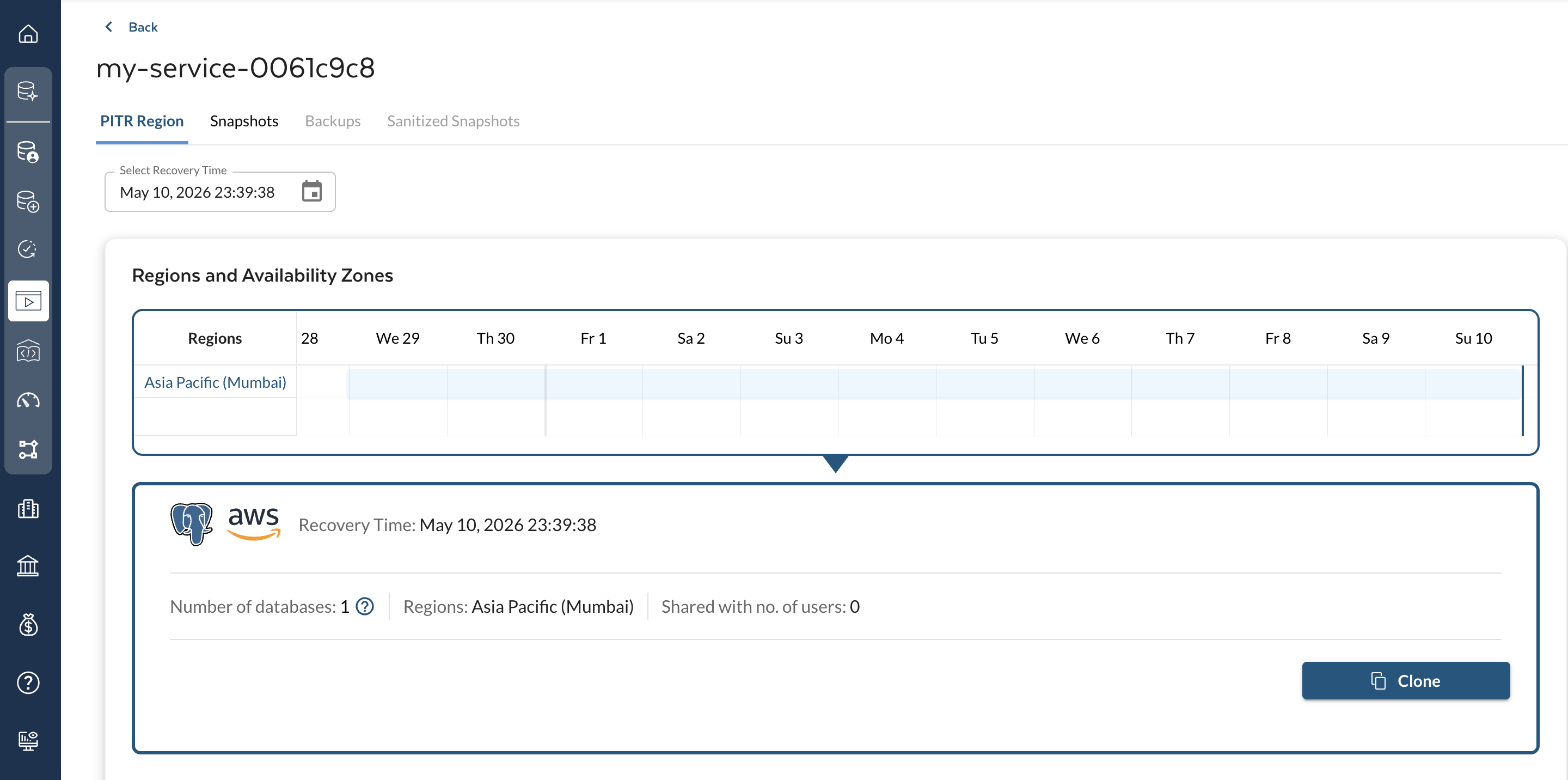
Selecting a database service from the dashboard opens its Dataflix home page. Below the service name, four tabs are available:
| Tab | What you can do |
| ----------------------- | ------------------------------------------------------------------- |
| **PITR Region** | Clone from any point in time within the continuous PITR data window |
| **Snapshots** | Clone from a specific manual or automatic snapshot |
| **Backups** | Download a native backup |
| **Sanitized Snapshots** | Clone from a masked (sanitized) snapshot |
> **Note:** A tab is only available if the corresponding data type has been configured or captured in the Availability Machine.
Figure 2 — Dataflix home page
***
## How do I clone from a PITR region?
1. Go to the **PITR Region** tab.
2. Select a **date and time** from the **Select Recovery Time** box. This moves the blue line on the continuous data region in the **Regions and Availability Zones** panel.
| Element | Description |
| --------------- | ------------------------------------------------- |
| Cloud regions | Regions where your database service is deployed |
| Daily data flow | 24-hour view of continuous data within the region |
| Blue line | Selected recovery time |
| Red line | Last available point-in-time restore point |
3. Review the data point details (number of databases, cloud details, shared users).
> Next to **Number of databases**, click the question mark icon to view the list of databases in the service.
4. Click **Clone** (bottom right). The clone creation form opens.
5. Fill in the [clone creation form](#clone-creation-form).
6. Click **+ Clone Service** to submit.
Tessell automatically:
1. Submits the clone request.
2. Creates the compute instance(s).
3. Configures the database.
4. Sets up the Availability Machine.
5. Triggers the first snapshot.
***
## How do I clone from a snapshot?
1. Go to the **Snapshots** tab.
2. Use the **Search** bar to find a specific snapshot, or use the region filter to narrow results.
3. Select a snapshot to review details (creation timestamp, size, databases, cloud details, shared users).
4. Click **Clone** (bottom right). The clone creation form opens.
5. Fill in the [clone creation form](#clone-creation-form).
6. Click **+ Clone Service** to submit.
Tessell automatically creates the compute instance(s), configures the database, sets up the Availability Machine, and triggers the first snapshot.
***
## How do I clone from a sanitized snapshot?
1. Go to the **Sanitized Snapshots** tab.
2. Use the **Search** bar to find a specific sanitized snapshot, or filter by region.
3. Select a sanitized snapshot to review details (creation timestamp, size, databases, cloud details, shared users).
4. Click **Clone** (bottom right). The clone creation form opens.
5. Fill in the [clone creation form](#clone-creation-form).
6. Click **+ Clone Service** to submit.
Tessell automatically creates the compute instance(s), configures the database, sets up the Availability Machine, and triggers the first snapshot.
***
## How do I download a backup?
The Backups tab supports Tessell's no-lock-in principle: you can download native backups and use them to recreate databases anywhere — on-premises or on any public cloud.
> **Note:** Only manually triggered native backups are available for download in Dataflix. Native backups generated through automated RPO schedules are not displayed here.
### Steps to download a backup
1. Go to the **Backups** tab and select a backup to view details (timestamp, size, databases, cloud details, shared users).
2. Click **Download** (bottom right). The **Download Backup for \** dialog opens.
3. Select an **expiry date and time** for the download URL and click **Submit**. After the URL is generated, **Backup Available** status appears below the backup name.
4. Click **Download** again (active only within the expiry window). The **Download Backup** dialog shows:
* Backup size and creation date (left panel).
* A shareable URL with copy icon, expiry date, and days remaining.
* A shell script for the URL (right panel) — copy or download using the top-right icons.
***
## Clone creation form
All clone creation flows — PITR, Snapshot, and Sanitized Snapshot — use the same form:
| Setting | Notes |
| ----------------------------------- | -------------------------------------------------------------------------------------------------------------------------------------------------------------------------------------------------------------------- |
| **Service name, description, tags** | Identify the cloned service |
| **Cloud provider settings** | Region, VPC/VNet, subnet. Cross-account and cross-region cloning requires a Data Access Policy in the [Availability Machine app](/tessell/database-engines/tessell-for-postgresql/db-services/am-postgresql-doc.md). |
| **Compute shape** | Shows the parent database server configuration. Storage cannot be changed for a clone. |
| **Database instance** | Master credentials and connection settings |
| **Refresh schedule** | **No schedule** or **Automatic refresh** (choose day, time, and mode: Snapshot or PITR) |
| **Custom Scripts for Refresh** | Select pre- and post-scripts from the [Script Library](/tessell/database-engines/tessell-for-postgresql/db-services/script-library-postgresql.md) |
| **Maintenance window** | Maintenance schedule for the cloned service |
| **Performance Insights** | Enable or disable for the clone |
| **Availability Machine** | AM configuration for the clone |
**Refresh mode notes:**
| Mode | Behaviour |
| ------------ | ----------------------------------------------------------------------------------------------------------------------------------------- |
| **Snapshot** | Refreshes to the snapshot available at the configured time on the configured day(s). If no snapshot is available, the refresh is skipped. |
| **PITR** | Refreshes to the latest data available at the configured time on the configured day(s). If no data is available, the refresh is skipped. |
Use the **Code** button (top right of the clone form) to generate API calls in Shell, Python, Go, Java, JavaScript, or PowerShell.
---
# Agent Instructions
This documentation is published with GitBook. GitBook is the documentation platform designed so that both humans and AI agents can read, navigate, and reason over technical content effectively. Learn more at gitbook.com.
## Querying This Documentation
If you need additional information that is not directly available in this page, you can query the documentation by asking a question.
Perform an HTTP GET request on the following URL with the `ask` and `goal` query parameters:
```
GET https://docs.tessell.com/tessell/database-engines/tessell-for-postgresql/db-services/dataflix-postgresql-doc.md?ask=&goal=
```
`ask` is the immediate question: it should be specific, self-contained, and written in natural language.
`goal` is what the user is ultimately trying to achieve, the reason they need the answer. Sharing it helps GitBook give you a better, more relevant answer. A goal is most helpful when it describes the outcome the user wants rather than restating the question. For example, with `ask=how do I create an API token`, a goal like `automate deployments from our CI pipeline` lets GitBook tailor the answer to that use case.
The response will contain a direct answer to the question and relevant excerpts and sources from the documentation.
Use this mechanism when the answer is not explicitly present in the current page, you need clarification or additional context, or you want to retrieve related documentation sections.