> For the complete documentation index, see [llms.txt](https://docs.tessell.com/tessell/llms.txt). Markdown versions of documentation pages are available by appending `.md` to page URLs; this page is available as [Markdown](https://docs.tessell.com/tessell/database-engines/tessell-for-postgresql/db-services/readme-postgresql/homepage-postgresql/settings-postgresql.md).
# Settings
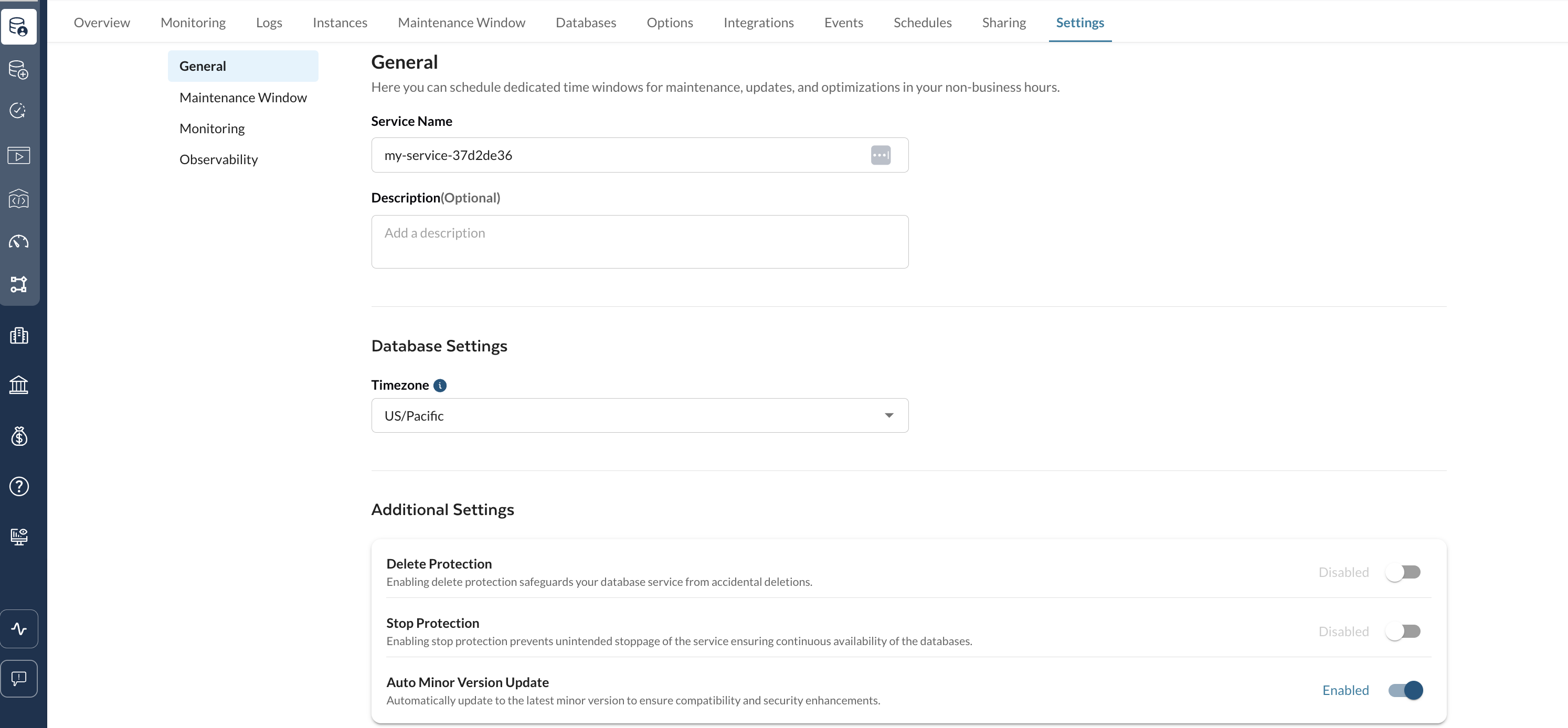
The Settings tab provides post-provisioning configuration options for your PostgreSQL database service. Changes here affect service behaviour without requiring a new provisioning.
***
## What settings are available in the General section?
| Setting | Description |
| ------------------------------------ | ------------------------------------------------------------------------------------------------------------------------------------------------------- |
| **Service name** | Rename the database service. |
| **Description** | Edit the free-text description. |
| **Database settings (Timezone)** | Choose a new timezone for your database service from the dropdown. |
| **Enable delete protection** | Toggle to prevent accidental deletion (disabled by default). When enabled, the Delete action is blocked. |
| **Enable stop protection** | Toggle to prevent accidental stop (disabled by default). When enabled, the Stop action is blocked. |
| **Enable auto minor version update** | Toggle to control automatic minor version updates (enabled by default). When enabled, Tessell automatically applies minor patches as they are released. |
***
## How do I update the maintenance window from the Settings tab?
In the **Maintenance Window** section, set:
* **Start day** — day of the week for the maintenance window.
* **Start time** — time of day to begin maintenance.
* **Duration** — length of the window (in 30-minute increments).
Click **Save** to apply the updated schedule.
***
## How do I enable or disable Performance Insights?
You must first create a **Monitoring Performance Insights Infrastructure** in the **Monitoring Performance Insights Infrastructure** application under the **DB Services** app family.
Once the infrastructure is deployed, toggle the **Performance Insights** button in the **Monitoring** section of the Settings tab to enable or disable it for this service. When enabled, Performance Insights analyses database load to identify bottlenecks and performance improvement areas. For more details, see the [Monitoring tab](/tessell/database-engines/tessell-for-postgresql/db-services/readme-postgresql/homepage-postgresql/monitoring-postgresql.md).
***
## What does the Observability section show?
The **Observability** section shows the alert policies currently applied to your service.
* Click **View details** on the **Alert Policies** panel to see a full breakdown:
* **Notification Channels** — where alerts are delivered (e.g., Slack channels, email addresses).
* **Alert Metrics** — the specific conditions that trigger alerts (e.g., Node Down, DB Service Node Down) with severity levels (e.g., Critical).
* **Metric & Notification Policies** — underlying policy names and metric types per alert group.
To modify policies or create new alert profiles, navigate to the [Observability app](/tessell/app-families/observability-doc.md).
Figure 1 — Settings tab
---
# Agent Instructions
This documentation is published with GitBook. GitBook is the documentation platform designed so that both humans and AI agents can read, navigate, and reason over technical content effectively. Learn more at gitbook.com.
## Querying This Documentation
If you need additional information that is not directly available in this page, you can query the documentation by asking a question.
Perform an HTTP GET request on the following URL with the `ask` and `goal` query parameters:
```
GET https://docs.tessell.com/tessell/database-engines/tessell-for-postgresql/db-services/readme-postgresql/homepage-postgresql/settings-postgresql.md?ask=&goal=
```
`ask` is the immediate question: it should be specific, self-contained, and written in natural language.
`goal` is what the user is ultimately trying to achieve, the reason they need the answer. Sharing it helps GitBook give you a better, more relevant answer. A goal is most helpful when it describes the outcome the user wants rather than restating the question. For example, with `ask=how do I create an API token`, a goal like `automate deployments from our CI pipeline` lets GitBook tailor the answer to that use case.
The response will contain a direct answer to the question and relevant excerpts and sources from the documentation.
Use this mechanism when the answer is not explicitly present in the current page, you need clarification or additional context, or you want to retrieve related documentation sections.